
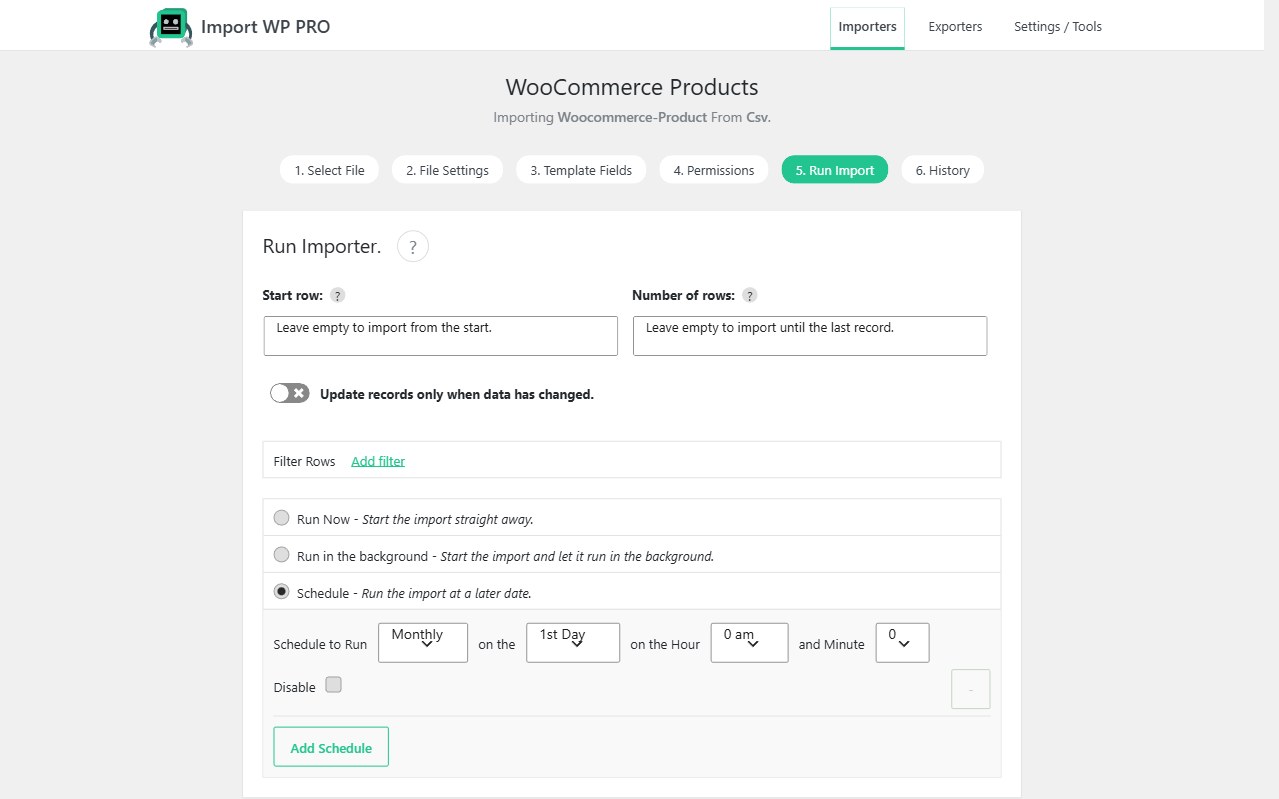
Manual uploads do not scale when prices, stock, or listings change on a timetable. Scheduled WordPress imports in Import WP Pro turn a saved importer into a job: fetch the latest CSV or XML, keep the mapping, and let WordPress stay in sync.
Import WP Pro. The free plugin runs CSV/XML imports by hand into core data types. Pro unlocks scheduling, background processing, CPTs, and custom fields.
WordPress cron CSV import
On the Run Import step, choose Schedule and set frequency: monthly, weekly, daily, or hourly, with extra dropdowns for the clock. Add Schedule if the same importer needs more than one pattern. Save & Schedule.
Import WP Pro can use:
- Built-in WP-Cron — works, but only as often as WordPress cron actually fires. Hook WP-Cron to the server task scheduler and run it every minute for reliable timing.
- Custom cron runner (v2.9+) — set
IWP_CRON_TOKENinwp-config.phpand hitwp-load.php?iwp_cron_token=…every minute with wget or your host’s scheduler. Faster, and compatible with Import WP’s “disable plugins during the run” settings.
That is a WordPress cron CSV import you can leave running: the mapping does not change; only the file contents do. Setup: How to schedule an importer.
Automate XML feed import into WordPress
The same scheduler works for XML. Point the importer at a remote URL or FTP path, set the XML base path once, and automate an XML feed import into WordPress on the interval the upstream actually updates.
Common patterns: RSS syndication into posts or a CPT, nested product or listing XML, nightly property feeds, and WooCommerce stock files (stock and price sync).
Status comes from the field you mapped — draft or publish — not a copy-paste from a feed reader. Parser: CSV, XML, and Excel. Store cron: Schedule WooCommerce product imports.
Scheduled remote feed sync for WordPress
A scheduled remote feed sync is fetch + map + unique key, on a clock.
Keep the datasource as remote URL, FTP/SFTP, server path, or Google Sheets. Pro pulls that location on each scheduled run so you are not uploading a new CSV every morning. Unique identifiers decide insert vs update. Filters drop rows you do not want (filter records).
Notifications on the importers list show waiting, next run, and progress. Cancel stops the current run and reschedules.
Use this for live supplier data. Do not put a one-off historical migration (full order history, a single membership dump) on hourly cron.
Skip unchanged records on repeat imports
Skip unchanged records so a 20,000-row file does not rewrite every post, product, or user when only a few prices moved.
Combine:
- A stable unique identifier (Permissions)
- Map only the fields that should change (leave editorial content unmapped)
- Skip unchanged so identical values are not written again
That saves CPU, database writes, bandwidth (especially images), and avoids bumping post_modified on every SKU for no reason. It is what makes hourly WordPress cron CSV import viable on a production host.
Compare Free vs Pro. Destinations the job can write: WordPress data importer.